The Integration Problem: Why AI Agents Need MCP
A powerful AI agent is useless if it can't access data and take actions in your real systems. An AI assistant that doesn't know a customer just called to complain can't support your sales team. An agent that can't update the CRM can't automate your sales workflow.
Before November 2024, the only solution was custom integration for every AI provider–business tool pair. This created an N × M problem:
- N AI providers (OpenAI, Anthropic, Google, Mistral...) × M business tools (CRM, helpdesk, database...) = hundreds of individual integrations
- Brittle code: Every API change breaks integrations
- Vendor lock-in: Switching from GPT-4 to Claude? Rewrite your entire integration layer
- Security chaos: Each integration handles auth and permissions differently
Model Context Protocol (MCP) was built to solve exactly this problem.
What Is MCP? History and Vision
Model Context Protocol is an open standard developed and released by Anthropic in November 2024, fully open-source on GitHub (modelcontextprotocol/specification).
Think of MCP as USB-C for AI: before USB-C, every device needed its own cable. USB-C created one universal connector standard. MCP does the same: instead of each AI model needing custom code to connect with every tool, MCP creates a common protocol that everyone speaks.
Remarkable adoption speed: Within months of launch, MCP was adopted by:
- OpenAI (Anthropic's direct competitor) — confirming this is a real standard
- Google DeepMind across the Gemini ecosystem
- Cursor, Windsurf, Continue — leading AI IDEs
- Zapier, Cloudflare, Docker, GitHub — with official MCP servers
MCP Architecture: 3 Core Components
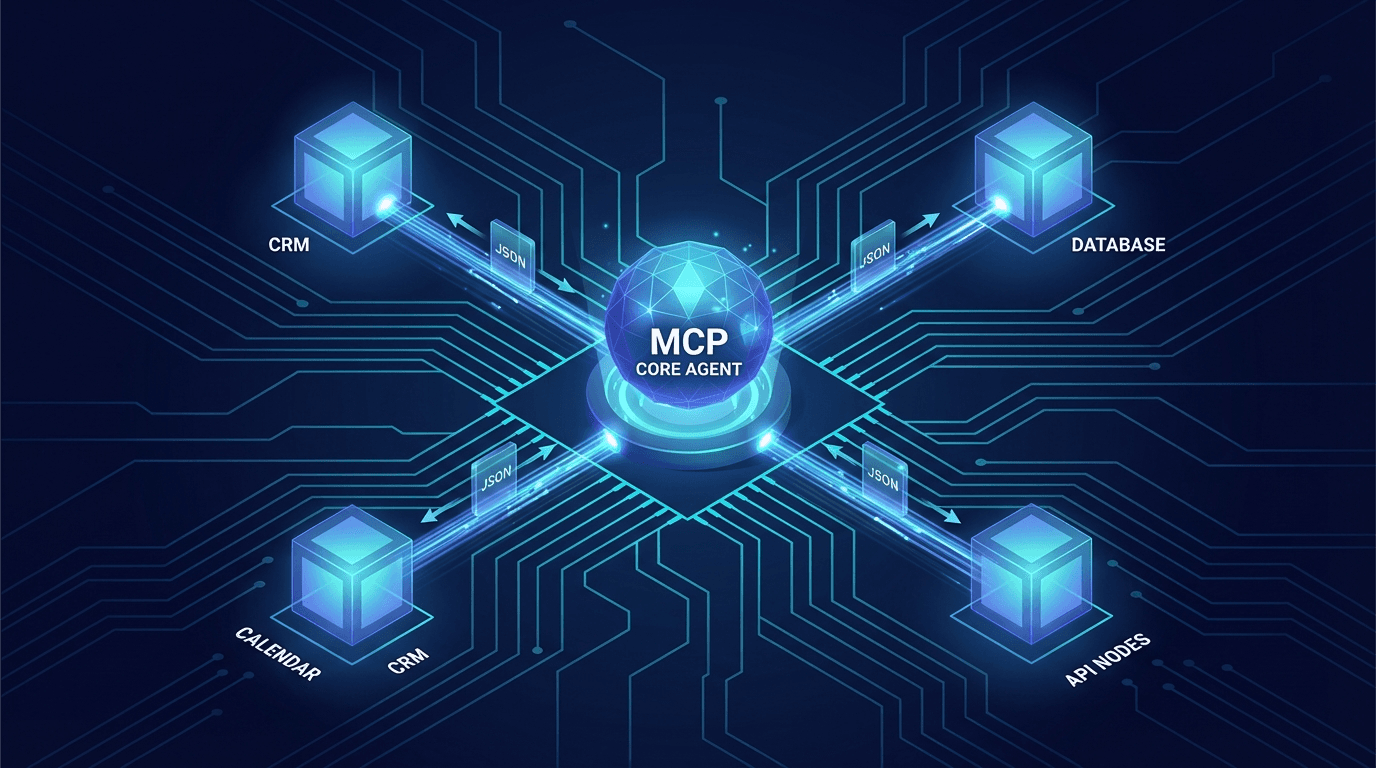
MCP operates on a client-server model with three distinct roles:
┌──────────────────────────────────────────────┐
│              AI Application (Host)            │
│  ┌──────────────┐    ┌───────────────────┐   │
│  │  LLM / Agent │────│    MCP Client     │   │
│  └──────────────┘    └────────┬──────────┘   │
└───────────────────────────────│──────────────┘
                                │  JSON-RPC 2.0 (stdio / SSE / HTTP)
          ┌─────────────────────┼─────────────────────┐
          │                     │                     │
  ┌───────▼──────┐    ┌─────────▼────┐    ┌──────────▼────┐
  │  MCP Server  │    │  MCP Server  │    │  MCP Server   │
  │    (CRM)     │    │  (Database)  │    │  (Helpdesk)   │
  └──────────────┘    └──────────────┘    └───────────────┘
1. MCP Host (AI Application)
The application containing the LLM — Claude Desktop, an IDE like Cursor, or your custom agent. The Host manages the full lifecycle of MCP connections and coordinates between the LLM and MCP Clients.
2. MCP Client
A component running inside the Host, maintaining a 1:1 connection with each MCP Server. The Client handles protocol negotiation, authentication, and message routing. One Host can run multiple MCP Clients, each connected to a different Server.
3. MCP Server
A lightweight service that exposes capabilities via the MCP protocol. One MCP Server can provide three types of capability:
| Capability | Description | Example |
|---|
| Tools | Functions the agent can call to perform actions | create_ticket(), update_crm() |
| Resources | Data sources the agent can read | Customer records, log files |
| Prompts | Reusable prompt templates with parameters | Standard response templates |
Execution Flow: From Query to Action
Step 1: Connection & Discovery
When the agent starts, the MCP Client connects to the server and calls tools/list to discover capabilities:
{ "jsonrpc": "2.0", "method": "tools/list", "id": 1 }
{
"tools": [
{
"name": "get_customer",
"description": "Retrieve customer information by ID or email",
"inputSchema": {
"type": "object",
"properties": {
"identifier": { "type": "string", "description": "Customer ID or email" },
"fields": { "type": "array", "items": { "type": "string" } }
The LLM receives this tool list as part of its system context — it knows what it's capable of before beginning to reason.
When the agent decides it needs to call a tool:
{
"jsonrpc": "2.0",
"method": "tools/call",
"params": {
"name": "get_customer",
"arguments": {
"identifier": "[email protected]",
"fields": ["name", "company", "last_interaction", "lead_score", "tier"]
}
}
}
{
"content": [{
"type": "text",
"text": "{\"name\":\"John Doe\",\"company\":\"Acme Corp\",\"tier\":\"enterprise\",\"last_interaction\":\"2026-02-10\",\"lead_score\":78}"
}]
}
Step 3: Reasoning Loop
Tool results are injected into the LLM's context. The agent continues reasoning — possibly calling additional tools, synthesizing information, or formulating the final response.
User: "Update John Doe's lead score by +10 because he just booked a demo"
  ↓
Agent: [calls get_customer("[email protected]")] → current score: 78
  ↓
Agent: [calls update_lead_score(contact_id="C-1234", score=88, reason="Booked demo 2026-02-21")]
  ↓
Agent: "Updated John Doe's lead score to 88/100. Note: Booked demo on Feb 21."
MCP vs Function Calling: Key Differences
Many developers confuse MCP with OpenAI Function Calling. Here's the critical distinction:
| Aspect | Function Calling (OpenAI) | MCP |
|---|
| Scope | Provider-specific | Universal open standard |
| Deployment | In-process | Separate server process |
| Discovery | Static (hardcoded) | Dynamic (runtime query) |
| Transport | None (API call) | stdio, SSE, HTTP Streaming |
| Reusability | Reimplement per app | One server, works everywhere |
| Security | Depends on implementation | Built-in auth, sandboxing |
| Stateful | No | Yes (server can maintain state) |
Concrete example: Build an MCP Server for HubSpot CRM today. That server immediately works with:
- Claude Desktop for your sales team
- Your custom AI agent built in-house
- Cursor IDE when developers need customer context
- Any MCP-compatible app released in the future
With pure Function Calling, you'd reimplement everything from scratch for each application.
Real-World Use Cases
1. AI Sales Assistant with CRM Integration
from mcp.server import Server
from mcp.types import Tool, TextContent
import json
app = Server("crm-mcp-server")
@app.list_tools()
async def list_tools():
return [
Tool(
name="search_contacts",
description="Search CRM contacts by name, email, or company",
inputSchema={
"type": "object",
"properties": {
"query": {"type": "string"},
"filters": {
"type": "object",
"properties": {
"tier": {"enum": ["free", "starter", "enterprise"]},
"last_active_days": {"type": "integer"}
}
},
"limit": {"type": "integer", "default": 10}
},
"required": ["query"]
}
)
]
@app.call_tool()
async def call_tool(name: str, arguments: dict):
if name == "search_contacts":
results = await crm_api.search(
query=arguments["query"],
filters=arguments.get(, {}),
limit=arguments.get(, )
)
[TextContent(=, text=json.dumps(results))]
Real scenario: Sales rep asks AI: "List enterprise customers with no contact in the last 30 days" → Agent calls search_contacts with the right filters → Returns actionable list with full context.
2. AI Customer Support with Multi-System Access
An AI support agent needs simultaneous access to multiple systems — which before MCP required complex custom plumbing:
Customer: "Where is my order #ORD-2024-5891?"

Agent reasoning:
  → [MCP: order_system]   get_order("ORD-2024-5891")
     Result: carrier=FedEx, tracking="FX123456", status="in_transit"

  → [MCP: logistics_api]  get_tracking("FX123456")
     Result: "In sorting facility, Chicago", ETA="Feb 23, 2026"

  → [MCP: crm_system]     get_customer_tier(order_id="ORD-2024-5891")
     Result: Premium customer, 0 previous complaints

  → Response: "Your order #ORD-2024-5891 is currently being
     sorted at our Chicago facility by FedEx and is on track
     for delivery on February 23rd. Track it with FX123456."
3. AI Business Analyst with Database Access
{
  "name": "run_business_query",
  "description": "Query data warehouse for business analytics",
  "inputSchema": {
    "properties": {
      "metric": {
        "enum": ["revenue_trend", "customer_cohort", "churn_analysis", "product_performance"],
        "description": "Type of analysis to run"
      },
      "period": { "type": "string", "description": "e.g. 'last_30_days', '2025-Q4', 'last_year'" },
      "group_by": { "type": "string", "description": "Breakdown dimension: channel, product, region" }
    },
    "required": [
CEO asks: "Q4 2025 revenue by sales channel, compared to Q3" → Agent calls run_business_query with correct parameters → Returns analysis with real numbers.
Security in MCP: Non-Negotiables
MCP provides multiple security layers, but correct implementation is your responsibility:
Authentication & Authorization
{
  "mcpServers": {
    "crm-production": {
      "command": "uvx",
      "args": ["my-crm-mcp-server"],
      "env": {
        "CRM_API_KEY": "${CRM_API_KEY}",
        "ALLOWED_OPERATIONS": "read,update",
        "MAX_RECORDS_PER_CALL": "50",
        "REQUIRE_USER_CONFIRMATION": "delete,bulk_update"
      }
    }
  }
}
Least Privilege Principle
Only expose exactly what the agent needs — nothing more:
| ❌ Dangerous | ✅ Safe |
|---|
execute_sql(query: string) | get_monthly_revenue(month, year) |
delete_records(table, condition) | archive_inactive_leads(days=90) |
admin_access() | read_dashboard_metrics(metric_name) |
send_email(to, subject, body) | send_order_confirmation(order_id) |
Audit Logging
Every tool call must be fully logged: timestamp, agent/user identity, tool name, sanitized arguments, response summary, and session context.
The MCP Ecosystem in 2025
MCP adoption is growing faster than any AI protocol in history:
AI Applications with MCP support:
- Claude Desktop — built-in MCP Client, community server marketplace
- Cursor / Windsurf / Continue — AI coding assistants
- Zed Editor — native MCP support
- Sourcegraph Cody — code search + AI
Official MCP Servers:
- GitHub — repo ops, PR management, issue tracking
- PostgreSQL / SQLite — direct database queries
- Cloudflare — Workers, KV, R2 management
- Docker — container and image management
- Zapier — 5,000+ app integrations via MCP
- Brave Search / Fetch — web access for agents
Getting Started with MCP: A Practical Roadmap
Initial Setup (30 minutes)
pip install mcp
npm install @modelcontextprotocol/sdk
npx @modelcontextprotocol/create-server my-crm-server
3-Week Rollout
Week 1 — Proof of Concept:
- Pick your single most valuable tool (usually a CRM query)
- Build an MCP Server with 2-3 simple tools
- Test interactively with Claude Desktop before deploying
Week 2 — Hardening:
- Add proper error handling and input validation
- Implement authentication (API key or OAuth)
- Add audit logging for every tool call
- Rate limiting and retry logic
Week 3 — Production:
- Dockerize and deploy to your infrastructure
- Monitor tool call patterns and latency
- Collect user feedback to expand the tool library
Start with high-impact, low-risk tools:
- Read-only tools (query CRM, fetch orders) — deploy first, safe by default
- Scoped write tools (update one specific field) — after validating reads
- Bulk operations (mass email, multi-record updates) — require extra review
Conclusion: MCP Is the AI Infrastructure Layer
MCP isn't just an integration technique. It's the foundational infrastructure for how AI works with businesses — the same way REST APIs standardized web services, or TCP/IP standardized internet communication.
Businesses that build MCP infrastructure early get a double advantage: AI agents that work better today, and easy upgrades as more powerful LLM models arrive — without rewriting your entire integration layer.
The question is no longer "Should we use MCP?" It's "Which tool do we start with?"
Want to go deeper on orchestrating multiple agents through MCP? Read our guide on Multi-Agent Systems — when one agent is enough, and when you need coordinated teams.